
Using VPNs for personal and Company purposes
1. What is a VPN?
A Virtual Private Network (VPN) creates a secure, encrypted connection between your device and a VPN server. While personal and company VPNs rely on the same underlying technology, they are designed with distinct purposes to solve entirely different problems.
2. Personal VPN
A personal VPN is primarily used by everyday internet users on devices like smartphones or computers, with the connection typically structured like this:
Without VPN:
Your device → Internet → Website
With VPN:
Your device → VPN server → Internet → Website
The website normally sees the public IP address of the VPN server, instead of your normal public IP address.
For example, your normal public IP may be:
`203.0.113.25`
After connecting to a VPN server, the website may see:
`204.0.125.28` (VPN server IP address)
3. Why do people use personal VPNs?
There are several common reasons:
- Privacy
- A VPN can hide your normal public IP address from websites.
- Security
- The connection between your device and the VPN server can be encrypted.
- This can be useful when using public Wi-Fi.
- Another network location
- If you connect to a VPN server in another country, websites may see the VPN server’s location instead of your real network location.
- Important point
- A personal VPN usually does **not** mean that your device has joined a company’s private network.
- The main purpose is usually to change the way your device connects to the Internet.
4. Company VPN
A company VPN is built for a different purpose altogether, mainly functioning to let employees securely access the company’s internal private network from anywhere outside the office. For example, a company may have:
- File servers
- Databases
- Internal websites
- Printers
- Company applications
Since these systems are often restricted to the company network, an employee working from home normally cannot access them directly—a problem that a company VPN effectively solves.
5. The problem with a normal Internet connection
Imagine an employee is working from home.
Their Internet provider gives them a public IP address:
`203.0.113.25`
The next day, they connect to another Wi-Fi network.Their public IP may become:
`207.0.121.20`
Later, they use mobile data the public IP may change again.
This is normal because the public IP address belongs to the network connection provided by the Internet provider.
Therefore, if a company needs to assign a fixed public IP address to an employee under special circumstances, it cannot simply use that address as a permanent address within the company network, as user identification becomes a challenge. An employee’s public IP address will change when the employee switches networks.
Furthermore, most devices on a company’s internal network are designed to communicate using internal network addresses. For security reasons, these devices may also have firewall or access-control rules that only allow connections from the company’s internal network, such as 10.10.0.0/24. A public IP address from the employee’s home or other external network does not automatically give the employee access to these internal devices.
This creates a problem.
6. How does a company VPN solve this problem?
The company can run its own VPN server.
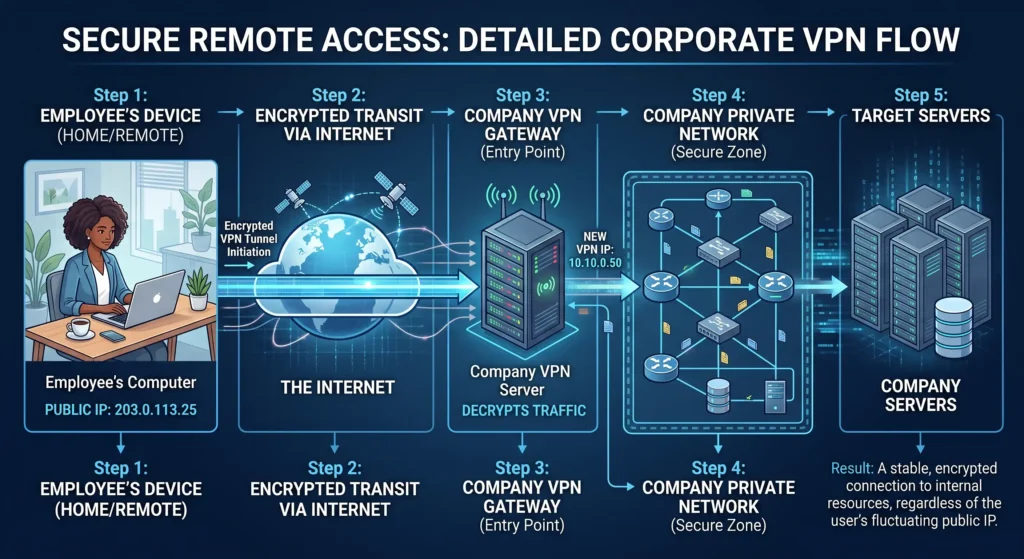
When the employee connects to the company VPN, the VPN server can give the employee a **virtual internal IP address**.
For example:
`10.10.0.50` or `192.168.34.50`
This address belongs to the company’s VPN network.
Now the employee has two different IP addresses.
- Public IP
- For example: `203.0.113.25`
- This comes from the employee’s Internet provider.Use to connect to the vpn server.
- It will change by employee’s Internet provider
- VPN IP
- For example:`10.10.0.50`
- This comes from the company VPN server.
- It is used inside the company’s private VPN network.
The connection now looks like this:
The company can run its own VPN server.
When the employee connects to the company VPN, the VPN server can give the employee a **virtual internal IP address**.
For example:
`10.10.0.50` or `192.168.34.50`
This address belongs to the company’s VPN network.
Now the employee has two different IP addresses.
- Public IP
- For example: `203.0.113.25`
- This comes from the employee’s Internet provider.Use to connect to the vpn server.
- It will change by employee’s Internet provider
- VPN IP
- For example:`10.10.0.50`
- This comes from the company VPN server.
- It is used inside the company’s private VPN network.
The connection now looks like this:
The important thing is that the company does not need to use the employee’s changing public IP as the employee’s internal network address.
The VPN server provides a manageable internal network address for VPN connections, which can be static or dynamic.
The VPN application on the user’s device uses authentication credentials or authentication methods, such as:
- Username and password
- Digital certificate
- Pre-shared key
- Token or enterprise authentication
This allows the VPN server to verify the user’s identity and determine whether the user is authorized to access the company network. The company can then manage what internal resources the user is allowed to access.
7. Why is this useful?
Imagine the company has these servers:
- `10.10.0.10` — File Server
- `10.10.0.20` — Database
- `10.10.0.30` — Internal Website
These servers are inside the company network.
The employee connects to the VPN and receives: `10.10.0.50`
Now the employee’s computer can communicate with the company servers through the VPN.
For example:
`10.10.0.50` → `10.10.0.10`
The employee can access the file server.
Or:
`10.10.0.50` → `10.10.0.20`
The employee can access the company database.
The employee can do this even though they are physically at home.
8. Why can't we just use encryption?
This is an important difference: encryption and VPNs are not the same thing. Encryption mainly answers the question, “How can we stop other people from reading the data?” whereas a company VPN answers, “How can we connect this remote computer to our private company network?” For example, while an employee might have a direct encrypted connection to protect database data, their computer fundamentally remains outside the company’s private network.
The company would still need to provide a way for that computer to access internal network addresses such as:
10.10.0.10
A VPN can provide this network connection.
After connecting to the VPN, the employee can receive an internal IP such as:
10.10.0.50
The employee’s computer can then communicate with other devices in the company VPN network.
Therefore:
Encryption protects the connection.
The VPN also creates a virtual connection to the private network.
This is why a company VPN is useful even though encryption can also be used without a VPN.
9. Conclusion
A VPN can be used for entirely different purposes depending on who is using it. For an everyday internet user, a VPN is primarily a tool for enhancing privacy, improving security, and changing the public IP address of their internet connection.
For a company, however, a VPN serves a more fundamental network function by allowing a remote computer to securely become part of the company’s private network. Since an employee’s real public IP address can change whenever they switch Wi-Fi networks or internet providers, the VPN provides a stable connection so the company does not have to depend on this changing public IP.
Instead, the company VPN can give the employee a virtual internal IP address, such as:
10.10.0.50
The employee can then use this internal address to communicate with company systems through the VPN.
So the key difference is:
- Personal VPN: “Connect me to the Internet through another server.”
- Company VPN: “Connect my computer to the company’s private network.”
And this is why a company VPN is not simply an encrypted connection. Encryption protects the data, while the VPN also provides a way for a remote device to communicate with the company’s private network.