
port 1 feature image

Port 1 vs. Modern Networking: How Connections Have Changed

Port 1 Image 1

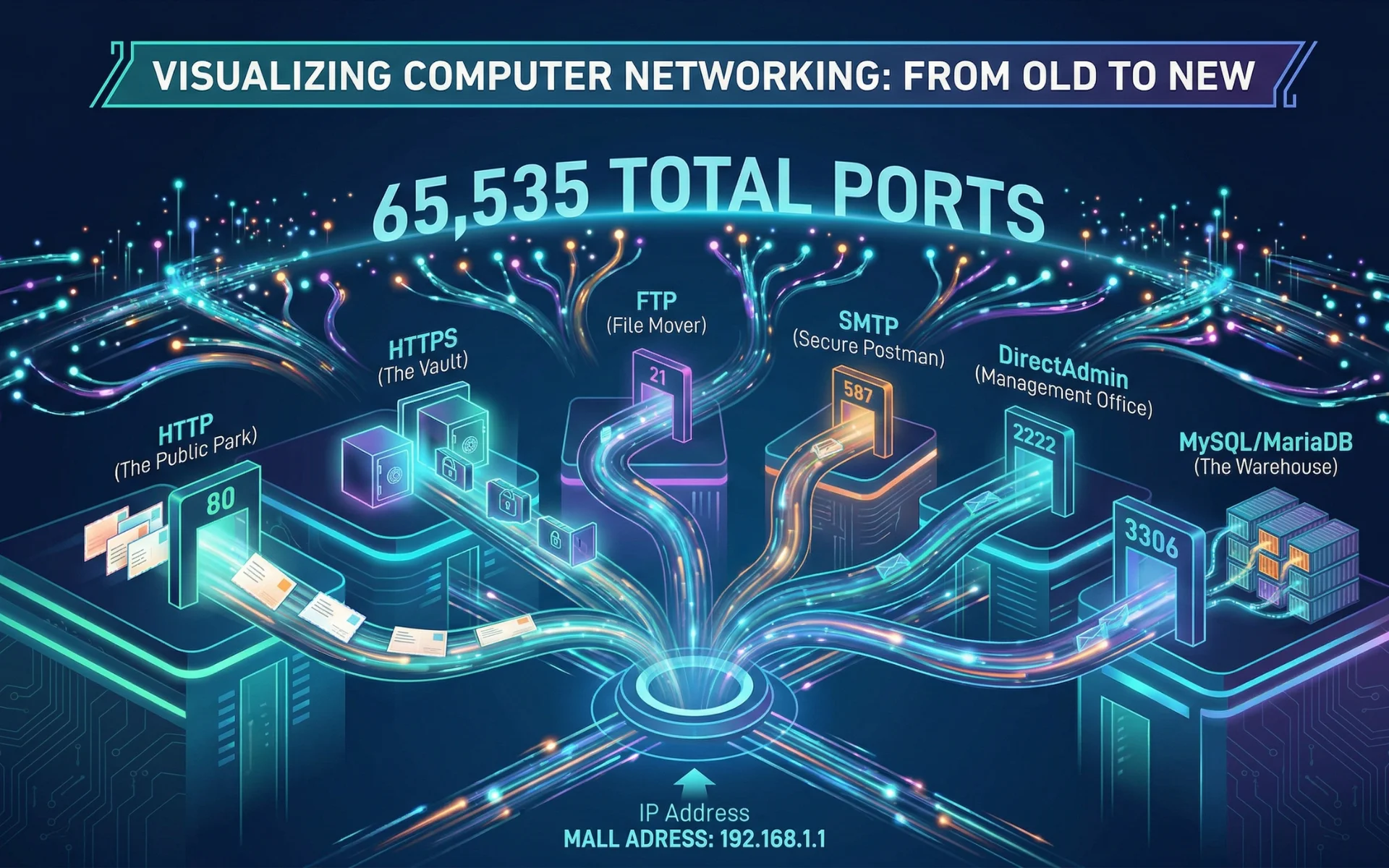
In computer networking, an IP Address is like the address of a shopping mall. To find a specific shop inside (like the Cinema), you need a Unit Number. In tech, these numbers are called Ports.

There are 65,535 “doors” available, and Port 1 is the very first one. While it was famous in the past, modern development has moved to a much faster system.

1.0 What Exactly is Port 1?

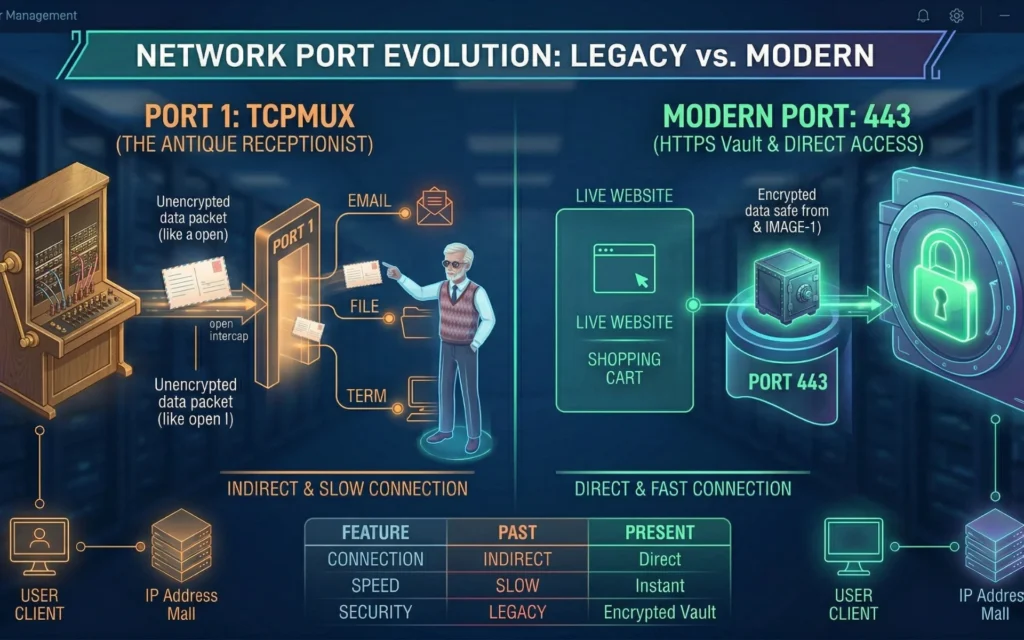
Port 1 is officially known as TCP Port Service Multiplexer (TCPMUX). Think of it as the Main Information Counter at the mall entrance.

In the 1980s, computers were slow and complicated. Instead of remembering many different port numbers, you would just connect to Port 1 and ask, “I want to send an email.” Port 1 would then act as a bridge and connect you to the right service.

2.0 Real-Life Examples: Who Used Port 1?

You won’t find Port 1 on a modern laptop or a standard website today. It was built for:

  • 1980s Mainframe Computers: Massive, room-sized computers (like the IBM System/370) used by banks to process thousands of transactions.
  • Early University Networks: Before the modern internet, students used Port 1 to jump between different research tools on a single server.
  • Legacy Unix Systems: The very first versions of the Unix operating system used Port 1 to manage multiple tasks at once.

3.0 Past vs. Present: Why We Don't Use Port 1 Anymore

Port 1 Image 3

Modern computers have replaced the “Middleman” (Port 1) with Direct Connections. This makes websites much faster and safer.

Feature

The Past (Using Port 1)

The Present (Modern Ports)

Connection

Indirect: You ask Port 1 first, then get moved.

Direct: You go straight to the specific “door.”

Speed

Slow: Two steps to connect.

Instant: One step connection.

Security

Risky: If Port 1 is hacked, every service is exposed.

Safe: Each door is locked separately.

Example

Talking to a Receptionist.

Using your own Keycard.

4.0 Where is Port 1? (How to find it)

Since ports are “virtual,” you have to use developer tools to see them:

  • On your Laptop: Open the Terminal (on Mac/Linux) or Command Prompt/PowerShell (on Windows) and type netstat -an. If you see a line ending in .1 or :1, it means Port 1 is active, though this “door” is usually closed on all modern laptops.
  • On a Server: If you use DirectAdmin, check the Firewall settings. If “1” is not in the allowed list, it is closed and your server is secure.
  • In a Laravel Project: You never use Port 1. Instead, you define your “Modern Ports” (like 3306 for the database) in your .env file.

5.0 Modern Ports Summary Table

For modern web development and server management, these are the “Modern Doors” that replaced the need for Port 1. Instead of asking a “receptionist” for directions, your applications now go straight to these specific numbers:

Port Number

Port Name

The Modern Role

Common Examples / Used By

Port 1

TCP Port Service Multiplexer (TCPMUX)

The Antique Receptionist

Ancient Mainframes (Legacy)

Port 21

File Transfer Protocol (FTP)

The File Mover 

Uploading files via FileZilla

Port 80

Hypertext Transfer Protocol (HTTP)

Standard Web 

Unencrypted website loading

Port 443

Hypertext Transfer Protocol Secure (HTTPS)

Secure Web 

Google, Facebook, Shopee

Port 587

Simple Mail Transfer Protocol (SMTP)

The Secure Postman

Sending emails via SMTP

Port 2222

DirectAdmin Panel

Management Office

Accessing your hosting dashboard to create emails or domains.

Port 3306

MySQL / MariaDB

Database Warehouse

Connecting your Laravel or WordPress code to your data tables.

Port 8000

Alternative HTTP

The Testing Lab

Running php artisan serve to preview your website locally.

Port 8083

HestiaCP / cPanel

Control Panel (CP)

Managing advanced server settings or third-party hosting tools.

5.1 A Detailed Guide to Modern Network Ports

To help you understand how these “doors” work in your daily development, here is a deeper look at each port. We’ve broken them down from the smallest number to the largest.

Port 1: The Antique Receptionist (TCPMUX)

  • What it is: The original “Information Counter” of the internet.
  • The Past: In the 1980s, instead of remembering 50 different port numbers, you just connected to Port 1 and asked for a service by name (like “Mail”). Port 1 would then “hand off” your connection to the right place.
  • Today: It is almost never used. If a hacker sees Port 1 open on your server, they assume the server is very old and easy to break into.

Port 21: The File Mover (FTP)

  • What it is: File Transfer Protocol.
  • The Job: This is the door used for moving files from your laptop to your web server.
  • Real-World Use: When you use a program like FileZilla to upload your Laravel code or WordPress images to a live server, you are usually “knocking” on Port 21.

Port 80: The Basic Web (HTTP)

  • What it is: The standard door for the World Wide Web.
  • The Problem: It is unencrypted. Everything sent through Port 80 is like a postcard written in pencil; anyone (like a hacker on public Wi-Fi) can read your passwords or data while it travels.
  • Today: Most modern websites automatically “push” users away from Port 80 and move them to the safer Port 443.

Port 443: The Secure Web (HTTPS)

  • What it is: The encrypted version of the web.
  • The Job: This is the most important door on the internet today. It uses SSL/TLS to lock your data in a digital safe.
  • Visual Cue: When you see the Padlock icon in Chrome or Safari, you are using Port 443. This is where almost all modern, public website traffic should go to stay safe.port 1 image 4

Port 587: The Secure Postman (SMTP)

  • What it is: The modern standard for sending emails.
  • The Job: When a website sends an automated receipt or a “Welcome” email to a user, it connects to an email provider through Port 587.
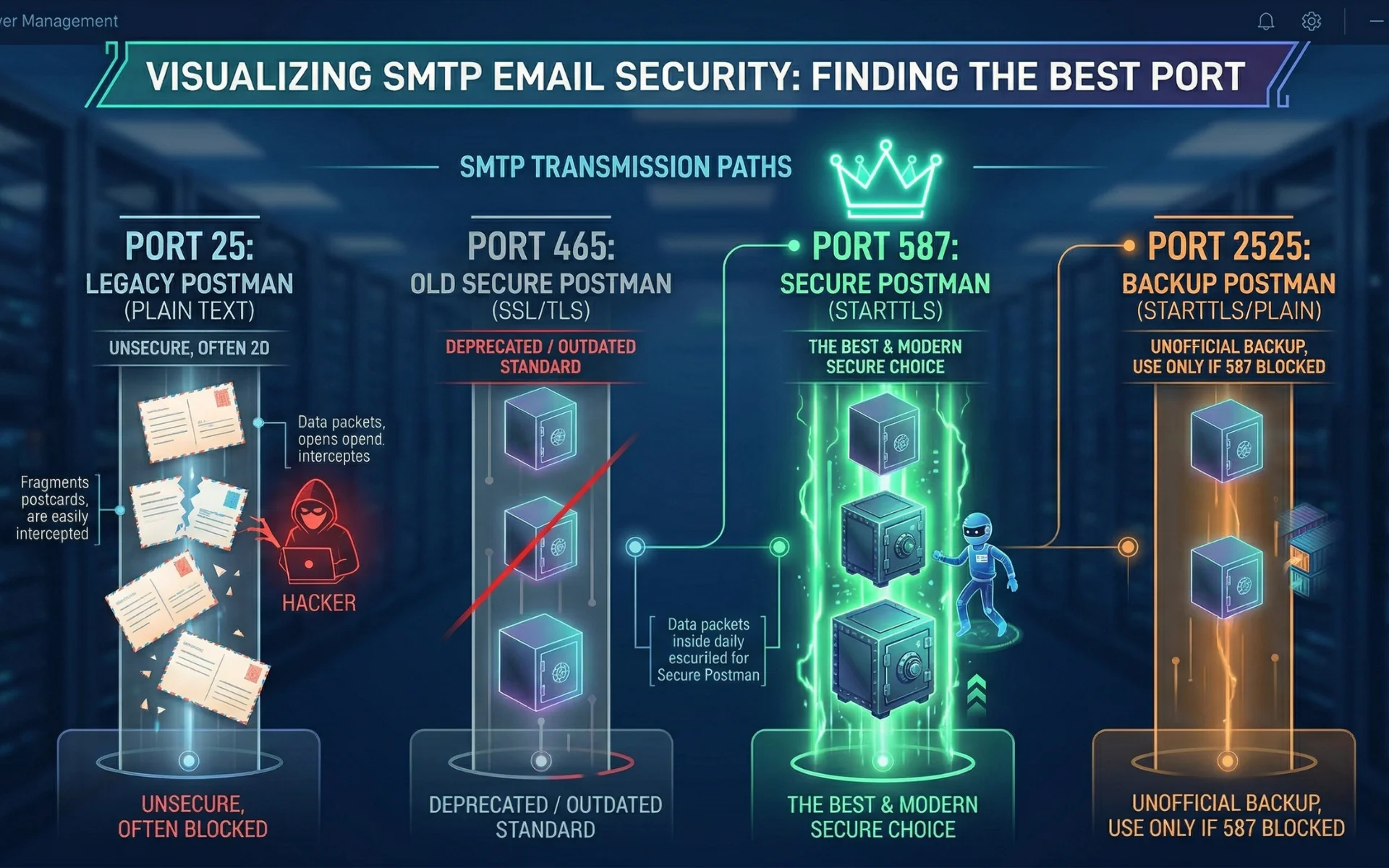
  • The Best Choice: Port 587 is the current industry standard because it requires secure login and is rarely blocked by internet providers.
  • Why others are less ideal:
    1. Port 25: The oldest port; it is usually blocked by providers because it is easily used for spam.
    2. Port 465: An older secure port that is now considered outdated (deprecated) by most modern systems.
    3. Port 2525: An unofficial backup port used only if Port 587 is blocked; it is not a formal standard.
Port 1 Image 2

Port 2222: The Management Office (DirectAdmin)

  • What it is: The specific door for DirectAdmin hosting panels.
  • The Job: This isn’t for your website visitors; it’s for developers. When you need to create a new database, set up an email account, or check server logs, you log into your IP address followed by :2222.

Port 3306: The Database Warehouse (MySQL/MariaDB)

  • What it is: The entry point for your Database.
  • The Job: This is where all your data “lives.” In your Laravel .env file, you tell the code to talk to DB_PORT=3306.
  • Security Tip: You should never open this port to the public. Only your website’s code should be allowed to enter this door.

Port 8000: The Testing Lab (Laravel Dev)

  • What it is: A “Local” port for developers.
  • The Job: When you run the command php artisan serve, Laravel opens a temporary door on your laptop (Port 8000). This allows you to see your website at localhost:8000 without putting it on the real internet yet.

Port 8083: The Control Panel (Hestia/cPanel)

  • What it is: An alternative management door.
  • The Job: Different server tools use different “Unit Numbers” for their offices. While DirectAdmin uses 2222, other popular tools like HestiaCP or cPanel setups often use 8083 or 2083. It serves the same purpose—allowing you to manage the backend of your server.

6.0 Concluding Port 1

To summarize, Port 1 is a piece of internet history—a digital relic like the floppy disk. While it was once the essential “Receptionist” that helped early mainframes stay organized, it has been completely replaced by the faster, more secure Direct Port system we use today.

In modern development with tools like Laravel and DirectAdmin, your focus should remain on keeping Port 1 closed. By ensuring this antique door stays locked and using modern standards like Port 443 (HTTPS) and Port 3306 (Database), you guarantee that your web projects stay secure, professional, and optimized for today’s internet.

Scroll to Top
