
Resolving Domain Abuse: Preventing Hackers from Using a Domain for Spam Email Activities
1.0 Introduction
Email remains one of the most widely used communication tools in both personal and professional environments. However, its popularity has also made it a primary target for cybercriminal activities. One of the most concerning threats is when hackers exploit a legitimate domain to send spam emails. These emails often appear authentic, making them more likely to deceive recipients. Domain abuse can occur without the domain owner’s knowledge, especially when proper security configurations are not in place. The consequences include reputational damage, loss of customer trust, and disruption of business communications. In severe cases, the domain or its associated IP address may be blacklisted, preventing legitimate emails from reaching recipients.
2.0 How Does This Happen?
Before going deep into the solution, we need a good understanding how a hacker uses your domain is the first step toward a solution. Hackers generally use one of these two methods.
2.1 Email Spoofing
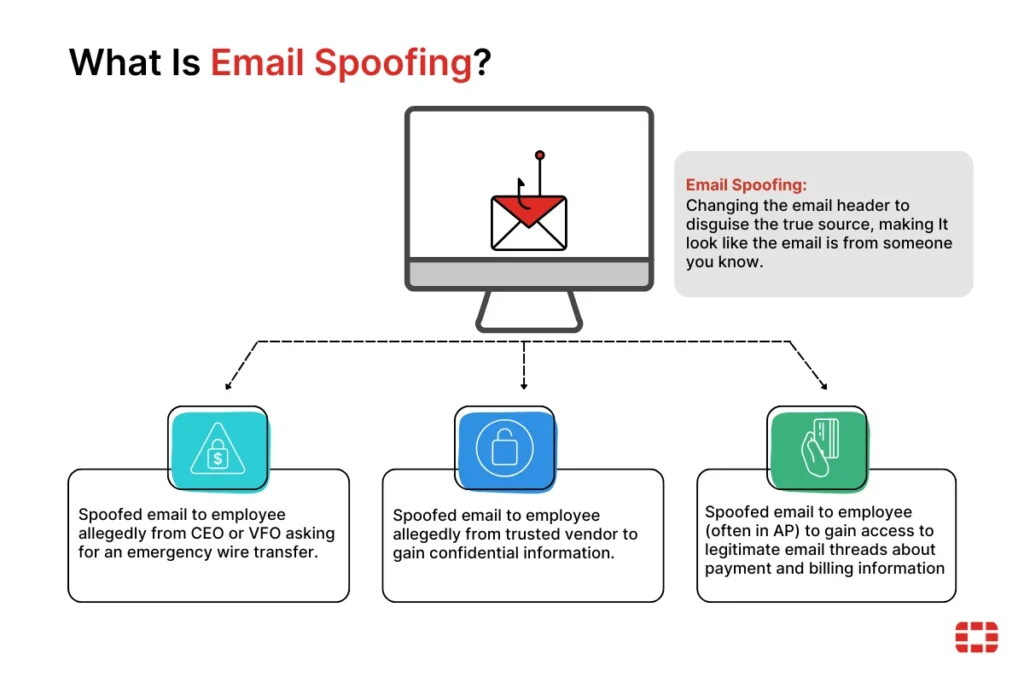
Email Spoofing involves changing the email header to disguise the true source, making it look like the email is from someone you know. Common scenarios include:
- CEO Fraud: A spoofed email sent to an employee allegedly from the CEO or VFO asking for an emergency wire transfer.
- Vendor Deception: A spoofed email allegedly from a trusted vendor used to gain confidential information.
- Billing/AP Exploitation: Spoofed emails sent to employees (often in Accounts Payable) to gain access to legitimate email threads regarding payment and billing information.
2.1 Account Takeover (Internal)
This is more dangerous. The hacker has gained access to a real user account via phishing, credential stuffing, or malware. They send spam through your actual mail server (e.g., Google Workspace or Microsoft 365), making the emails look 100% legitimate to security filters.
3.0 Causes and Impact
3.1 Root Causes of Vulnerability
Hackers target domains that exhibit specific “technical gaps”. The most common causes include:
- Missing or Weak DNS Records: Without SPF, DKIM, or DMARC, any server in the world can claim to be you.
- Weak Password Policies: Users without Multi-Factor Authentication (MFA) are vulnerable to credential stuffing.
- Compromised Web Scripts: If you host a website (like WordPress), outdated plugins can allow hackers to upload “mailer scripts” that send spam directly from your web server.
- Open SMTP Relays: Misconfigured mail servers that allow anyone to send mail through them without authentication.
3.1 Root Causes of Vulnerability
When a domain is used for spam, the damage is often categorized into three distinct areas of impact:
- Brand Erosion: Customers receiving spam from your “official” address lose trust in your digital security.
- Operational Downtime: If your domain is blacklisted, your sales and support teams cannot communicate with the outside world, halting business operations.
- Financial Liability: Spoofed emails targeting your own finance department can lead to fraudulent wire transfers and data breaches.
4.0 How to Fix This
4.1 Step 1: Immediate Triage and Containment
Before implementing permanent fixes, you must stop the active unauthorized mail flow.
- Force Global Password Resets: Immediately invalidate all active sessions and require new, complex passwords for all users.
- Enable MFA: Implement Multi-Factor Authentication across the entire organization to prevent hackers from regaining access even if they have a password.
- Audit Forwarding Rules: Hackers often set up “hidden” rules to forward your incoming mail to their own addresses. Check all user inbox settings for unauthorized forwarding rules.
- Review API and Third-Party Access: Revoke access for any third-party applications or “OAuth” tokens that look suspicious or are no longer in use.
4.2 Step 2: Implementing the DNS Trinity
To prevent Email Spoofing, you must configure three critical DNS records.
A. SPF (Sender Policy Framework)
SPF is a TXT record that lists all authorized IP addresses allowed to send mail on your behalf.
- Action: Ensure you only have one SPF record. If you use multiple services (e.g., Gmail and Mailchimp), they must be combined into a single record using include:.
- Policy: Move from a “Soft Fail” (~all) to a “Hard Fail” (-all) once your list of senders is verified.
Example: v=spf1 include:_spf.google.com ~all
B. DKIM (DomainKeys Identified Mail)
DKIM adds a cryptographic “digital signature” to every email. It proves that the email was not tampered with during transit.
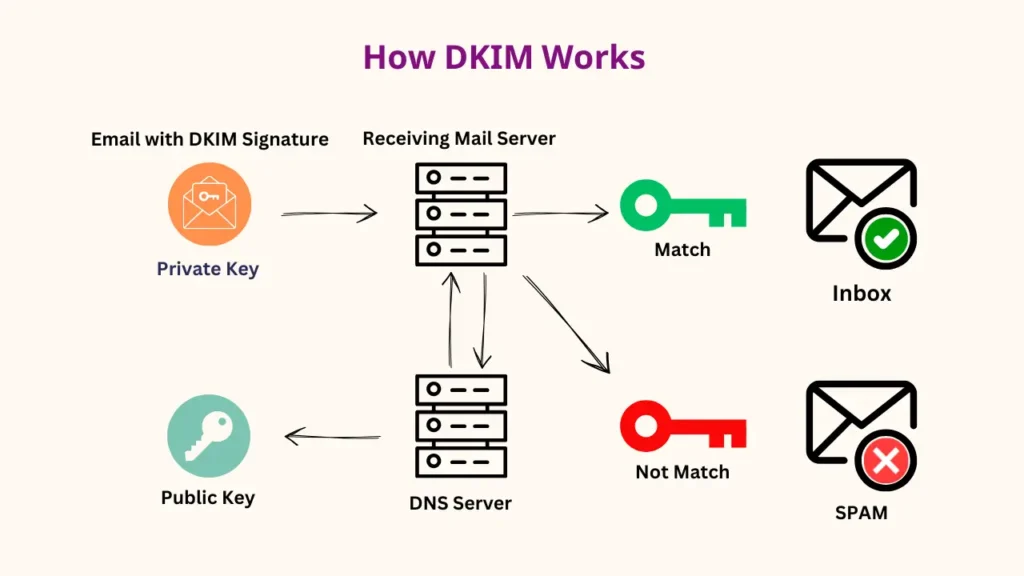
- Action: Generate a DKIM key in your email admin console and add the public key to your DNS provider.
C. DMARC (Domain-based Message Authentication, Reporting, and Conformance)
DMARC tells the world what to do if an email fails SPF or DKIM checks.
- Level 1 (p=none): Monitoring mode. You receive reports on who is sending mail as you but no mail is blocked.
- Level 2 (p=quarantine): Suspicious mail is sent to the recipient’s spam folder.
- Level 3 (p=reject): The “Gold Standard.” Any email that does not pass your SPF/DKIM checks is deleted by the receiving server and never reaches the recipient.
| Protocol | Analogy | Primary Function |
|---|---|---|
| SPF | The Guest List | Validates the IP address of the sender |
| DKIM | The Wax Seal | Validates that the content hasn’t changed |
| DMARC | The Security Guard | Dictates the action taken on failure |
4.3 Step 3: Server-Side Security and Malware Scanning
If the spam is coming from an Internal Account Takeover, you must secure the infrastructure:
- Web Server Scan: If you use a website, scan all directories for unauthorized .php files that contain “mail()” functions.
- Disable Open Relays: Configure your mail server to require authentication for all outbound mail.
- IP Reputation Monitoring: Use tools like MxToolbox to check if your server’s IP address has been flagged on global Blacklists (RBLs).
4.4 Step 4: Reputation Recovery
Once the security gaps are closed, you must rehabilitate your domain’s standing with major providers (Gmail, Outlook, Yahoo).
- Request Delisting: Contact the major blacklists (e.g., Spamhaus, Barracuda) and provide evidence that the breach has been resolved.
- Use Postmaster Tools: Sign up for Google Postmaster Tools to monitor your domain’s “Reputation Score” in real-time.
- Domain Warm-up: For 2–4 weeks, avoid sending massive marketing campaigns. Send only high-quality, essential emails to “re-train” spam filters that your domain is now
5.0 Conclusion
Domain abuse is a critical threat that can paralyze a business’s communication infrastructure. By understanding the difference between external spoofing and internal account takeovers, organizations can deploy the correct countermeasures. Implementing a strict DMARC “reject” policy is no longer optional; it is a foundational requirement for modern digital security.
Get a professional website built by Latitude Innovation.
WhatsApp Us: https://wa.me/60104348799/
Our Services: https://latitudeinnovation.com.my/web-design-service/