
Shall We Update the Plugins? A Simple Guide for Website Owners
1.0 Introduction
If you manage a WordPress website, you have probably seen this message many times:
“Plugin updates available.”
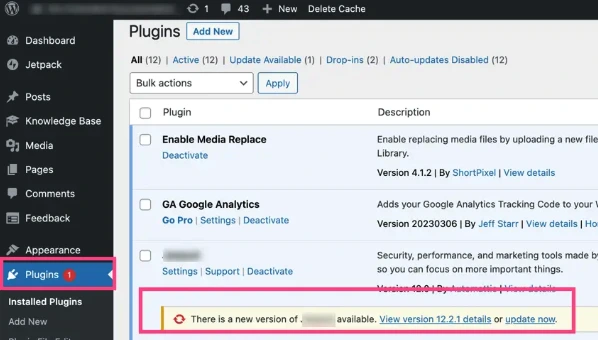
And most of the time, the reaction is the same.
“Should I update now… or later?”
“What if something breaks?”
“Better not touch it for now…”
This hesitation is very normal. Because updating sounds simple, but it also feels risky. Especially when your website is already running fine and you do not want to disturb anything.
So the real question is not just “Should we update the plugins?”
It is “How do we update them safely without causing problems?”
Let’s walk through it in a simple and practical way.
2.0 What Is a Plugin?
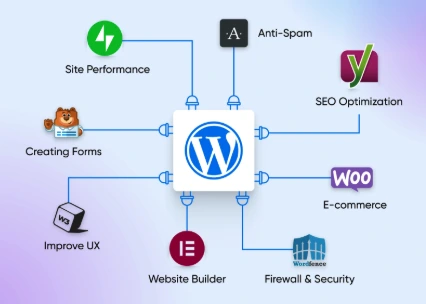
A plugin is basically an extra feature that you add to your website. Without plugins, a WordPress website is quite basic. It can show pages and posts, but not much more. Once you install plugins, your website becomes more powerful.
For example, plugins allow you to:
- Add a contact form
- Improve your website’s SEO
- Protect your site from attacks
- Create an online store
- Add sliders, popups, or booking systems
So in simple terms, plugins are what make your website useful. But here is something important.
Every plugin is built by developers. And just like any software, it needs to be maintained and improved over time. That is why updates exist.
3.0 Why Updating Plugins Matters
At first glance, updating a plugin may not seem urgent. Your website is working. Everything looks fine. So why touch it? But behind the scenes, a lot is happening.
Sometimes, updates fix security issues that you cannot see.
Sometimes, they improve performance.
Sometimes, they fix small bugs that might become bigger problems later.
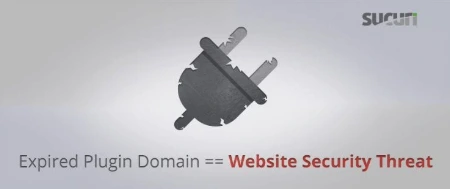
The biggest risk of not updating is security. Hackers often look for outdated plugins because they know those versions may have known weaknesses. When developers release updates, they are usually fixing those weaknesses.
So when you delay updates for too long, you are not just delaying improvements. You are leaving your website exposed. At the same time, updating everything blindly is also not a good idea. That is where balance is important.
4.0 When Should You Update?
This is where many people get confused. Should you update immediately every time?
Not always.
If the update is related to security or involves important plugins like payment, login, or protection, it is usually better to update sooner. But if your website is running an important campaign, or receiving a lot of traffic, updating at that moment might not be the best idea.
Imagine updating your plugins during a peak sales period and something breaks. That is a bigger problem than delaying the update for a short time. So the timing matters.
A good approach is to update when:
- Your website is stable
- You have time to check everything after
- You have a backup ready
4.1 Update Frequency by Website Type
Not every website needs the same level of attention. The frequency of your updates often depends on the complexity of your site and the type of data it handles.
- E-commerce & Membership Sites (High Priority):
These websites should be checked weekly or even daily for critical security patches. Because they handle sensitive customer data and financial transactions, they are prime targets for hackers. Frequent updates ensure that payment gateways remain secure and the shopping experience is never interrupted by a bug that could lead to lost sales. - Business & Informational Websites (Medium Priority):
For a standard company site, a monthly update schedule is usually sufficient. This allows you to stay current with security patches and performance improvements without needing to perform maintenance every few days. - Landing Pages & Portfolio Sites (Low Priority):
If your site is a simple one-page landing page or a static portfolio, you might only need to update it once every few months or when a major WordPress core update is released. Since these sites have fewer “moving parts” and rarely process sensitive data, the risk of a breach is lower, though they still require occasional check-ins to ensure links and forms remain functional.
5.0 How to Update Without Breaking Your Website
Now this is the part that really matters. Updating plugins is easy. But updating safely is what protects your website.
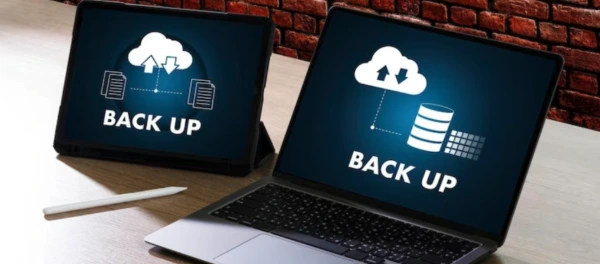
Before clicking the update button, the most important thing is backup.
Always make sure you have a full backup of your website. This includes both your files and your database. If something goes wrong, you can restore everything back.
Next, avoid updating everything at once. It might be tempting to click “Update All,” but if something breaks, you will not know which plugin caused it. Instead, update one plugin at a time, then quickly check your website.
Open your homepage.
Test your forms.
Click a few buttons.
Just a quick check is enough to confirm everything is still working.
For more important websites, it is even better to test updates on a staging version first. This means updating on a copy of your website before applying changes to the live one.
6.0 The Common Mistake Most People Make
Most website problems do not happen because of updates. They happen because updates were ignored for too long. When plugins are left outdated for months, then suddenly updated all at once, conflicts are more likely to happen.
Another common mistake is installing too many plugins. The more plugins you have, the higher the chance of conflict. Keeping only what you really need makes your website more stable and easier to maintain.
7.0 Final Thought
So, shall we update the plugins?
Yes. But not blindly, and not carelessly.
Think of plugin updates like maintaining your car.
You do not ignore it completely, and you also do not randomly change everything at once.
You check, you plan, and you do it properly.
A well maintained website is not just faster.
It is safer, more stable, and easier to manage.
And in the long run, that saves you more time than avoiding updates ever will.
8.0 References
- WordPress Documentation: Updating WordPress.
https://wordpress.org/documentation/article/updating-wordpress/ - WPBeginner: How to Properly Update WordPress Plugins.
https://www.wpbeginner.com/beginners-guide/how-to-properly-update-wordpress-plugins-step-by-step/ - BigCommerce: The Ultimate Guide to Ecommerce Website Maintenance.
https://www.bigcommerce.com/blog/ecommerce-website-maintenance/ - WP Creative: How Often Should You Update Your WordPress Plugins?
https://wpcreative.com.au/how-often-should-you-update-your-wordpress-plugins/ - White Label Coders: How often should you update WordPress site?
https://whitelabelcoders.com/blog/how-often-should-you-update-wordpress-site/
9.0 Ready to Elevate Your Website?
Get a professional website built by Latitude Innovation.
WhatsApp Us: https://wa.me/60104348799/
Our Services: https://latitudeinnovation.com.my/web-design-service/