
Easy WordPress Page Builder Comparison: 3 Top Picks
- Elementor vs Divi vs WPBakery
- What Is a WordPress Page Builder?
- Elementor. Flexible and Modern
- Divi. Structured All In One System
- WPBakery. Older but Still Around
- Direct Comparison Table
- Elementor Free Version and Elementor Pro Version
- Website Performance and Search Visibility
- Which One Should You Choose?
- Final Thought
- References
- Ready to Elevate Your Website?
1.0 Elementor vs Divi vs WPBakery
A WordPress page builder comparison is something every WordPress user eventually needs to make. If you are building websites with WordPress, sooner or later you will face this question. Should you use Elementor, Divi, or WPBakery? All three are page builders. All three promise visual editing. All three say you do not need coding. But in real workflow, they feel very different.
- Deadlines are real.
- Client revisions are real.
- Performance matters.
So the real question is not just which one is popular. It is this:
“Which one actually helps you build faster and manage changes easier?”
Let’s break it down properly.
2.0 What Is a WordPress Page Builder?
A page builder is a tool that allows you to design pages visually instead of writing code. Instead of editing text in the backend and previewing separately, you:
- Drag elements onto the page
- Adjust spacing visually
- Edit content live
- See changes instantly
Page builders make WordPress easier for business owners, marketers, and designers. This WordPress page builder comparison focuses on the three most common ones:
- Elementor
- Divi
- WPBakery
3.0 Elementor. Flexible and Modern

Elementor changed how many people use WordPress. Before Elementor, editing meant switching between backend and preview repeatedly. That slowed things down. Elementor introduced true live editing.
3.1 What Elementor Allows You to Do
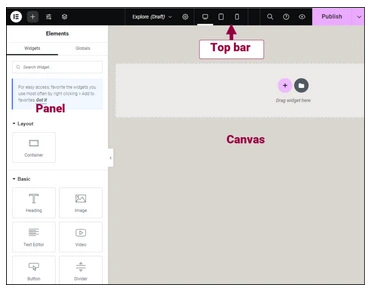
In real workflow, Elementor helps because:
- You edit directly on the screen
- Spacing control is clear and visual
- Mobile and desktop layouts can be adjusted separately
- Sections can be reused
- Headers and footers can be built
- Forms and popups can be created
When clients ask:
- “Can we increase the spacing here?”
- “Can we hide this section on mobile?”
Elementor handles those revisions quickly. That keeps your workflow smooth.
4.0 Divi. Structured All In One System

Divi is both a theme and a builder. When you use Divi, you usually stay inside its ecosystem. This can feel stable and organized.
4.1 Where Divi Works Well

Divi provides:
- Many ready made layouts
- Strong visual builder
- Built in theme customization
- Global styling system
For users who like a complete system in one package, Divi works well.
4.2 Where Divi Feels Slower
In real usage:
- The interface can feel heavier
- Complex layout adjustments take more clicks
- Fine spacing control feels less intuitive compared to Elementor
Divi is powerful, but sometimes feels more opinionated.
5.0 WPBakery. Older but Still Around

WPBakery was very popular before Elementor. Many older themes still use it.
5.1 How WPBakery Feels
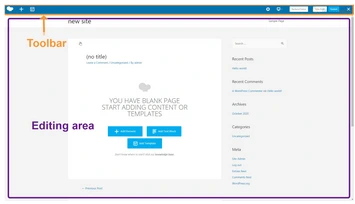
WPBakery often separates backend builder and frontend preview.
That means:
- You edit in blocks
- Then preview separately
- Layout adjustments are less visual
For beginners, this can feel less intuitive.
5.2 When WPBakery Makes Sense
WPBakery is practical when:
- Maintaining older websites
- Working with legacy themes
- Updating existing client systems
But for new builds, most designers prefer Elementor.
6.0 Direct Comparison Table
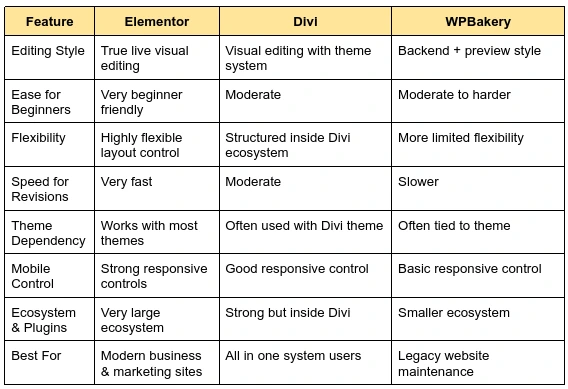
Here is a quick WordPress page builder comparison covering editing style, flexibility, and ease of use across all three tools.
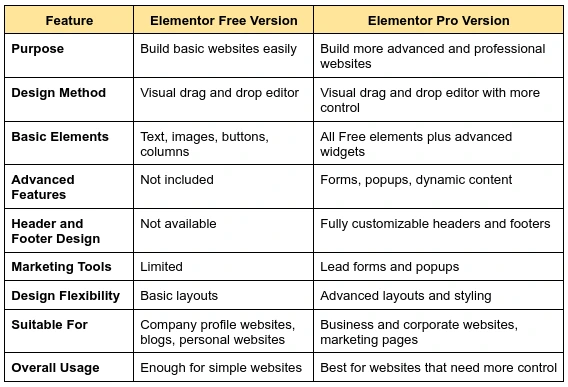
7.0 Elementor Free Version and Elementor Pro Version
8.0 Website Performance and Search Visibility
Elementor websites can be fast and search engine friendly when built properly.
8.1 Website Performance
Website speed depends more on hosting quality, image optimization, and clean design than on the page builder itself. Elementor does not slow down a website if used correctly. Avoiding unnecessary animations and heavy effects helps keep performance smooth.
8.2 Search Engine Visibility
Elementor follows WordPress standards and works well with SEO plugins. Proper use of headings and structured content helps search engines understand and rank your website better.
9.0 Which One Should You Choose?
Your answer to this WordPress page builder comparison really depends on your own workflow and the type of projects you handle.
9.1 Choose Elementor if:
- You need flexible layout control
- Your projects involve frequent client revisions
- You build marketing driven or conversion focused websites
- Mobile responsiveness requires detailed control
- You want compatibility with most modern WordPress themes
Elementor works well for modern business websites where adaptability and speed of revision matter.
9.2 Choose Divi
- You prefer working within a complete theme ecosystem
- You value having theme and builder integrated together
- You want access to many ready made layouts in one system
Divi can be suitable for users who prefer an all in one structured environment.
9.3 Choose WPBakery if:
- You are maintaining older WordPress websites
- Your existing theme depends on WPBakery
- Rebuilding the site is not currently an option
WPBakery remains practical for legacy maintenance, but it is less commonly chosen for new builds.
10.0 Final Thought
There is no single winner in this WordPress page builder comparison, since every situation calls for something different. Each tool serves a different workflow style.
However, for modern WordPress projects that require flexibility, efficient revisions, and long term scalability, Elementor often provides a strong balance between usability and control.
The most important factor is not the feature list, but how smoothly the tool supports:
- Your design process
- Client revision cycles
- Website performance goals
- Future growth requirements
Choosing the right builder should always be based on practical workflow needs, not just popularity.
11.0 References
12.0 Ready to Elevate Your Website?
Get a professional website built by Latitude Innovation.
WhatsApp Us: https://wa.me/60104348799/
Our Services: https://latitudeinnovation.com.my/web-design-service/