
Warning: Astra_Ext_Nav_Menu_Loader::load_gutenberg_addon_scripts(): The script tried to access a property on an incomplete object. Please ensure that the class definition "WPML_LS_Menu_Item" of the object you are trying to operate on was loaded _before_ unserialize() gets called or provide an autoloader to load the class definition in /home/liinovtion/domains/latitudeinnovation.com.my/public_html/wp-content/plugins/astra-addon/addons/nav-menu/classes/class-astra-ext-nav-menu-loader.php on line 164

Warning: Astra_Ext_Nav_Menu_Loader::load_gutenberg_addon_scripts(): The script tried to access a property on an incomplete object. Please ensure that the class definition "WPML_LS_Menu_Item" of the object you are trying to operate on was loaded _before_ unserialize() gets called or provide an autoloader to load the class definition in /home/liinovtion/domains/latitudeinnovation.com.my/public_html/wp-content/plugins/astra-addon/addons/nav-menu/classes/class-astra-ext-nav-menu-loader.php on line 164

Warning: Astra_Ext_Nav_Menu_Loader::load_scripts(): The script tried to access a property on an incomplete object. Please ensure that the class definition "WPML_LS_Menu_Item" of the object you are trying to operate on was loaded _before_ unserialize() gets called or provide an autoloader to load the class definition in /home/liinovtion/domains/latitudeinnovation.com.my/public_html/wp-content/plugins/astra-addon/addons/nav-menu/classes/class-astra-ext-nav-menu-loader.php on line 134

Warning: Astra_Ext_Nav_Menu_Loader::load_scripts(): The script tried to access a property on an incomplete object. Please ensure that the class definition "WPML_LS_Menu_Item" of the object you are trying to operate on was loaded _before_ unserialize() gets called or provide an autoloader to load the class definition in /home/liinovtion/domains/latitudeinnovation.com.my/public_html/wp-content/plugins/astra-addon/addons/nav-menu/classes/class-astra-ext-nav-menu-loader.php on line 134

Deprecated: ElementorPro\Modules\Notes\Database\Models\Note::query(): Implicitly marking parameter $connection as nullable is deprecated, the explicit nullable type must be used instead in /home/liinovtion/domains/latitudeinnovation.com.my/public_html/wp-content/plugins/elementor-pro/modules/notes/database/models/note.php on line 252

Deprecated: ElementorPro\Core\Database\Model_Base::query(): Implicitly marking parameter $connection as nullable is deprecated, the explicit nullable type must be used instead in /home/liinovtion/domains/latitudeinnovation.com.my/public_html/wp-content/plugins/elementor-pro/core/database/model-base.php on line 66
7 Steps Collect Targeted Email Address From Google - Latitude Innovation

How to collect targeted email address from Google?


Step 1

Go to Google.com and click setting at the right bottom of the screen.

Step 2

Set the result per page to maximum which is 100 and click save.

Step 3

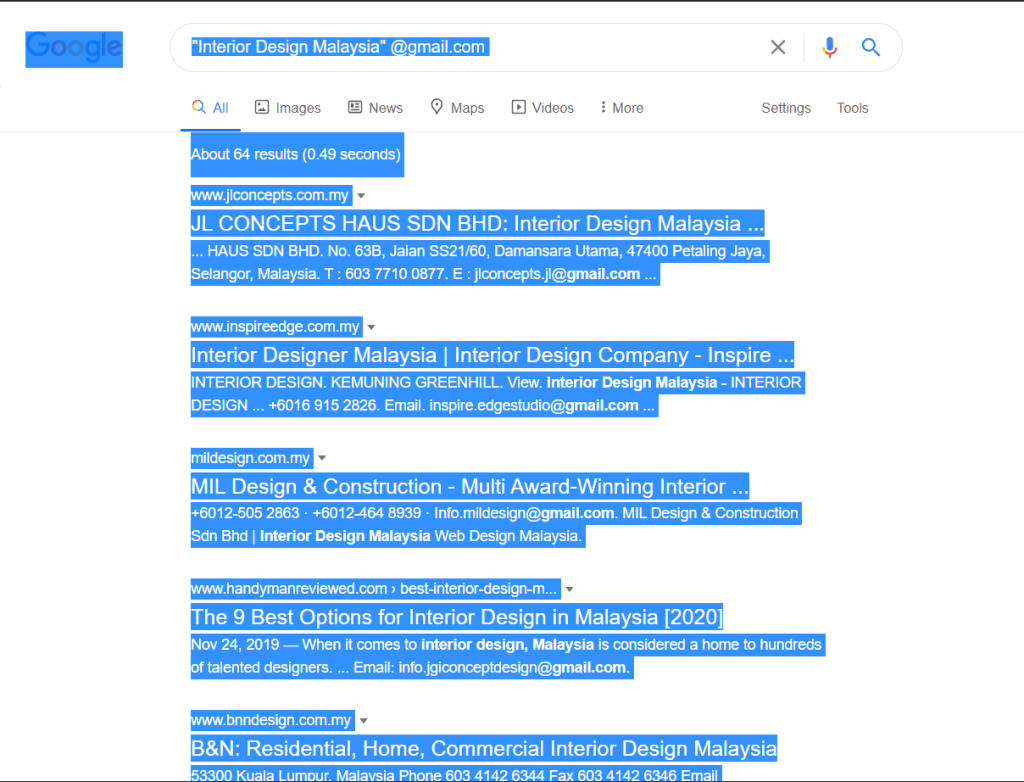
Insert your target email address in the search bar with open-close bracketing comma and put “@gmail.com” at the back.

Step 4

Open a new tab and search email extractor lite. (Note: Here is what I used -> http://eel.surf7.net.my/)

Step 5

Back to the search result tab. Highlight the whole page result (CTRL + A) and copy (CTRL + C).
Step 6

Paste it in the column Input Window and click “Extract”.

Step 7

The result will be show in the next column and will show how many email detected in the result.

Scroll to Top