
Why My Website’s Site Icon Suddenly Disappeared from Google Search (And the Unexpected Server Setting That Caused It)
As a web developer, one thing I’ve learned is that not every SEO issue is actually an SEO issue.
Recently, I encountered a problem with one of the websites I manage, KidzEnrol, that took days of investigation to solve. What looked like a simple missing favicon in Google Search eventually led us to discover an unexpected server-level configuration that was preventing Google from indexing the homepage.
I’m writing this article because I couldn’t find many real-world cases that matched my experience. Hopefully, if someone faces the same issue in the future, this will save them days of troubleshooting.
1.0 The Problem
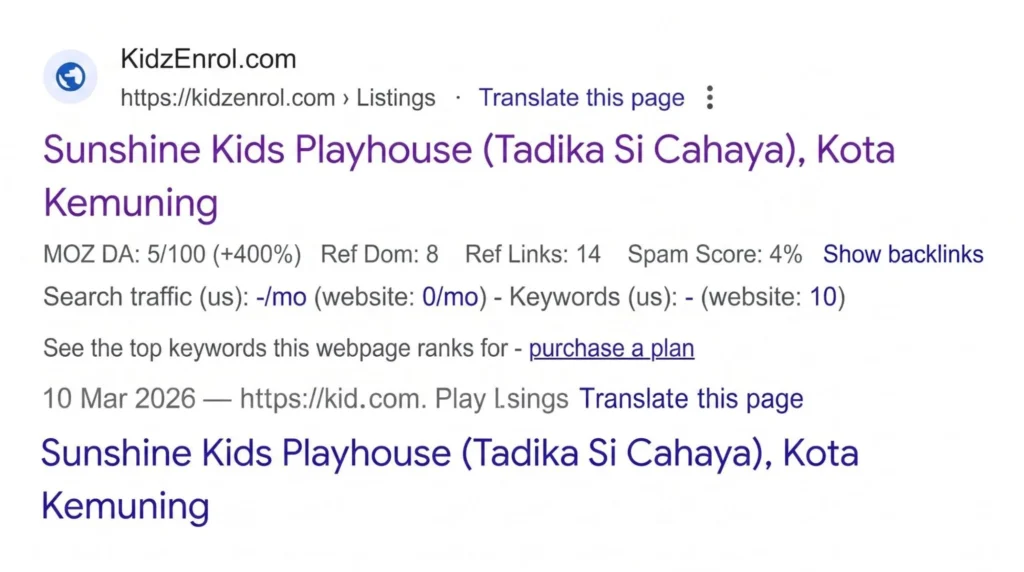
Everything was working perfectly. Google had already indexed the KidzEnrol website, and its site icon (favicon) appeared correctly in Google Search results.
Then one day, the favicon disappeared. At first glance, this didn’t seem like a major issue. The favicon was still correctly configured on the website, and if I visited the site directly, everything looked normal. So why wasn’t Google showing it anymore?
2.0 First Thing I Checked
The first thing I did was inspect the website using Google Search Console. That’s when I noticed something strange. The homepage (/) was no longer indexed. What’s even more confusing is that the homepage had already been indexed previously.
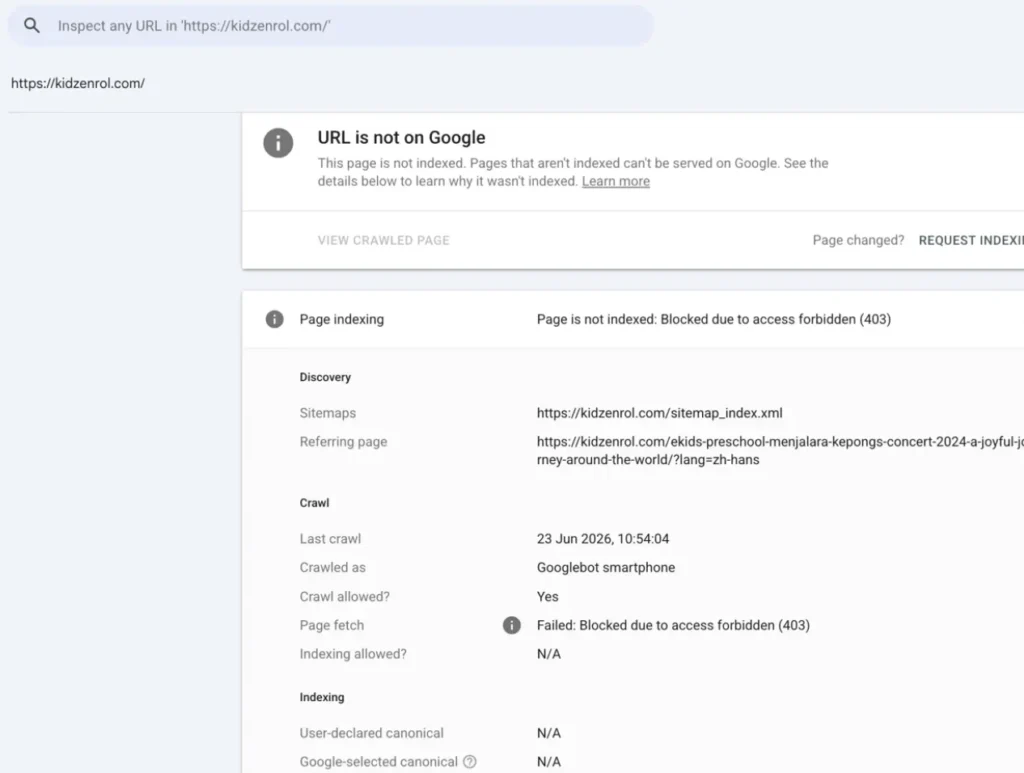
Meanwhile, many other pages on the website were still indexed without any issues. That immediately gave me a clue. Google usually retrieves the favicon information from the website’s homepage. If the homepage isn’t indexed, Google may stop displaying the site’s favicon in search results even if the favicon itself is perfectly configured. So the real problem wasn’t the favicon.
The real problem was:
Why was Google suddenly unable to index the homepage?
3.0 The Investigation
This became a process of elimination.
We checked almost everything that could potentially block Google. Some of the things we investigated included:
- Cloudflare security settings
- Bot protection rules
- Firewall configurations
- Robots.txt
- Meta robots tags
- Sitemap
- Crawl requests in Google Search Console
- URL Inspection reports
Every time we made a change, we requested indexing again through Google Search Console. And that’s where the frustrating part began. Unlike fixing a CSS issue, where you instantly know whether it worked, indexing requires patience. After every change, we had to wait several days before knowing whether Google accepted the page again. If it failed, we had to investigate another possibility, make another adjustment, request indexing again, and wait once more. This cycle repeated multiple times.
4.0 The Discovery
Eventually, one of my colleagues decided to inspect the server configuration instead of focusing only on WordPress and Cloudflare. That’s when we found something interesting inside the server’s .htaccess configuration. The website contained custom rewrite rules that specifically filtered bots based on their User-Agent.
It looked something like this:
- It explicitly allowed a list of “good” bots, including Googlebot.
- It blocked a long list of crawlers, scraping tools, and generic bots.
On paper, this looked like a reasonable security measure. The intention was to reduce unwanted crawling and scraping. However, after comparing this website with several other websites on the same server, we noticed something important. Most websites only had the standard WordPress rewrite rules.
They did not include this additional bot-filtering configuration. That immediately raised a question. Could this custom security rule somehow be interfering with Google’s crawling?
5.0 The Fix
To test our theory, my colleague temporarily relaxed the bot restrictions by allowing all bots instead of filtering them through the custom rules. After making the change, we requested indexing for the homepage once again.
Then we waited. A few days later, Google successfully indexed the homepage. Shortly after that, the site icon appeared again in Google Search results. Problem solved.
6.0 What Probably Happened
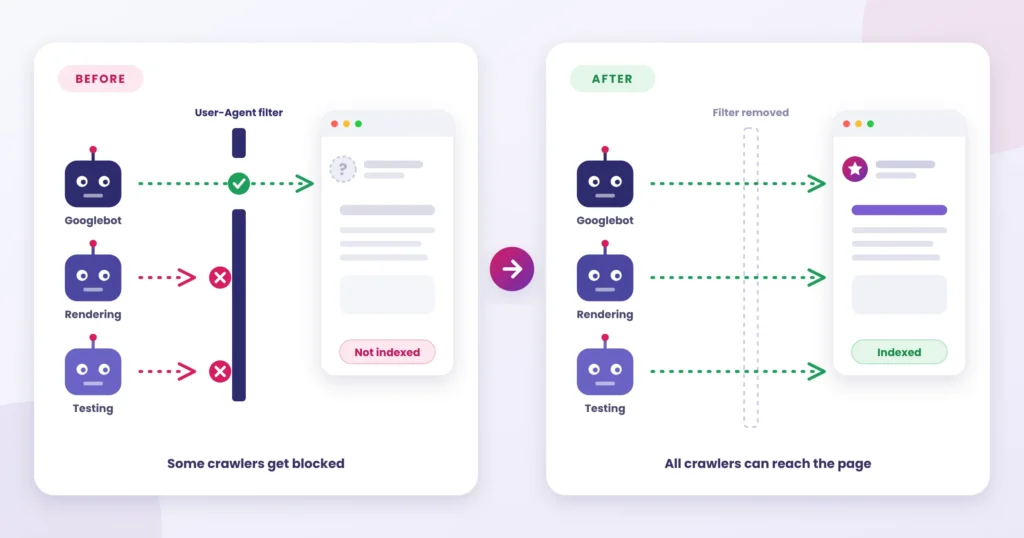
Although Googlebot was technically included in the allow list, modern search crawling isn’t always performed using a single User-Agent. Google uses different crawlers and services for rendering, testing, and fetching resources. Security layers, rewrite rules, or server configurations that rely heavily on User-Agent filtering can sometimes interfere with legitimate crawling in unexpected ways.
In our case, the custom bot-filtering configuration appeared to be preventing Google from processing the homepage correctly. Once those restrictions were removed, Google was finally able to crawl and index the page again.
7.0 What I Learned
This issue taught me several valuable lessons.
1. A Missing Favicon Isn’t Always a Favicon Problem
If your favicon suddenly disappears from Google Search, don’t immediately assume the icon file is broken. Check whether your homepage is still indexed. The favicon may simply disappear because Google no longer recognizes the homepage as an indexed page.
2. Google Search Console Should Be Your First Stop
Google Search Console quickly revealed that the homepage was missing from Google’s index. Without checking Search Console, we could have spent much longer investigating the wrong issue.
3. Don’t Only Look at WordPress
As developers, we often focus on plugins, themes, or SEO settings. Sometimes the actual problem exists much deeper in the web server itself. Server configurations, security rules, reverse proxies, Cloudflare settings, or firewall rules can all affect Google’s ability to crawl your website.
4. Security Configurations Need Balance
Blocking malicious bots is important. However, aggressive filtering can unintentionally block legitimate crawlers or interfere with search engine indexing. Every security rule should be tested carefully to ensure it doesn’t affect SEO.
5. SEO Fixes Require Patience
One of the most challenging parts of technical SEO is the waiting. Unlike frontend development, you can’t instantly verify whether a fix worked.
Every indexing request may take days before Google processes it. That means troubleshooting SEO issues often requires patience, careful documentation, and changing one variable at a time.
8.0 Final Thoughts
This wasn’t the most complicated bug I’ve ever encountered, but it was certainly one of the most interesting. A missing favicon led us through Google Search Console, Cloudflare, SEO diagnostics, bot protection settings, and finally into the server configuration itself.
In the end, the issue wasn’t caused by WordPress, the favicon, or even Google. It came down to a custom server security rule that unintentionally prevented Google from properly indexing the homepage. If you ever face a situation where your site’s favicon suddenly disappears from Google even though it’s correctly configured, don’t forget to check whether your homepage is still indexed. And if you’ve already ruled out the usual SEO suspects, it might be worth looking at your server-level security configuration as well. Sometimes, the answer isn’t on your website at all; it’s in the layer protecting it.