
Understanding of WooCommerce Settings

1.0 Introduction

When managing a WordPress website, it is important to make sure that the page title, permalink and content are correct before publishing a post. If a post is first created using a temporary or dummy name, WordPress may create a URL based on that name. Even if the title and content are changed later, the original URL may still exist and can be discovered and indexed by Google. This can result in unexpected URLs appearing when checking the website through Google Search.

For example, a post may initially be created with the title “Testing”, causing WordPress to create the URL yourdomain/testing/. Later, the post may be changed into a proper article’s name, but the /testing/ URL may still remain. If Google has already discovered the URL, it may continue to appear in Google’s index until the old URL is properly handled and Google updates its records.

2.0 Why Did the Incorrect URL Appear?

The main reason was that the post was originally created using a dummy name. When the post was first created as “Testing”, WordPress generated the permalink based on that name. This created the URL /testing/.

Later, the post was changed manually into the correct name. However, changing the title or content does not necessarily mean that the existing permalink has been changed. The original /testing/ URL may still be associated with the post.

Once the URL was published, Google could discover it through the website’s internal links, sitemap or other sources. Google may then crawl and index the URL. This means that even after the content was updated, Google could still have the old URL in its index.

This is why it is important to remember that the post title, content and permalink are separate elements in WordPress. Updating the title or conten

3.0 Why Did the Old URL Still Lead to the Post?

In this case, visiting /testing/ did not show a 404 page. Instead, it led to the post. This can happen when the old URL is being redirected to the current URL.

A redirect tells the browser and search engines that the requested URL has been moved to another URL. This is useful when a URL has been changed intentionally because visitors who use the old URL can still reach the correct content.

However, the presence of a redirect does not mean that Google will immediately remove the old URL from its search results. Google needs to recrawl the URL, process the redirect and update its index. Therefore, an old URL may continue to appear in Google for some time even after the URL has been corrected.

4.0 Use Case - Why Did This Happen When the Website Was in Chinese?

The issue was not caused by using Chinese content or by manually changing the post into Chinese.

The problem was mainly related to the initial dummy title and permalink. The post was created with a temporary name first, and the final URL was not checked or updated before the post was published.

If a website does not use WPML or another multilingual plugin, manually changing the title and content to Chinese is still possible. However, the permalink must also be checked manually because WordPress treats the permalink separately from the visible title and content.

For example:

Initial post:

Title: Testing
URL: /testing/

After updating the content:

Title: 汽車維修方案
URL: /testing/

The title has changed, but the URL can still remain /testing/ unless it is manually changed.

5.0 How to Prevent This from Happening

The best way to prevent this issue is to avoid publishing posts with dummy names whenever possible. The final title and permalink should be decided before the post is published.

Before clicking Publish, check the following:

Post title → Permalink/Slug → Content → SEO settings → Publish

If the article is supposed to be a Chinese article, the final title and appropriate URL slug should be prepared before publishing. For example, instead of creating a post called “Testing” and changing it later, create the post with its actual article title and check the generated permalink before publishing.

This reduces the possibility of Google discovering and indexing an unnecessary dummy URL.

6.0 What to Check Before Publishing a New Post

Before publishing any new article, always check the permalink separately from the title.

For example:

Title: 汽車維修方案
Correct URL: /汽車維修方案/

Do not assume that changing the title will automatically produce the correct URL, especially when an existing post has already been published.

It is also recommended to open the final URL in the browser after publishing to confirm that the correct article loads. This simple check can help identify incorrect URLs before Google discovers them.

7.0 What to Do If a Wrong URL Has Already Been Indexed
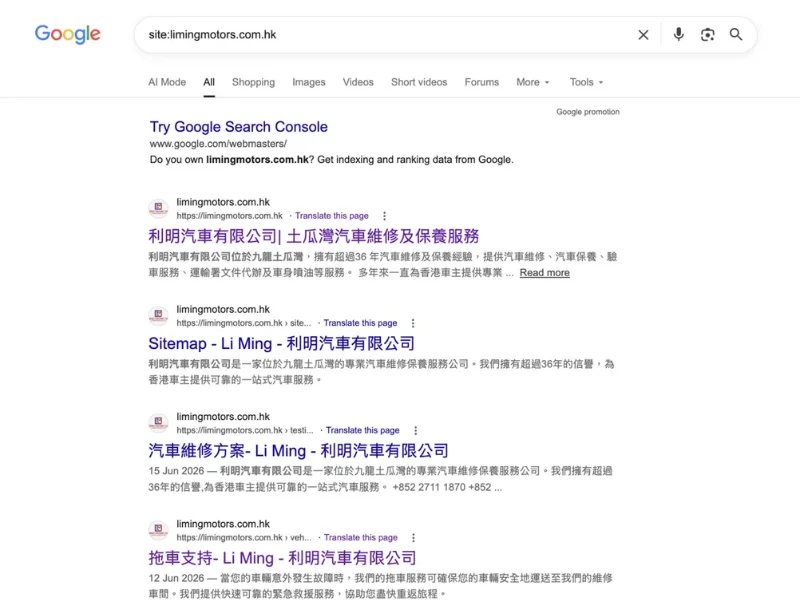
If a wrong URL has already been published and discovered by Google, first determine what should happen to that URL.

If the content has moved to a new URL, the old URL should normally be redirected to the correct URL. This allows users and search engines to reach the new location.

If the old URL should no longer exist and there is no suitable replacement, the old URL should return a proper 404 or 410 response instead of showing unrelated content.

After fixing the URL, check the correct URL in Google Search Console and request indexing if necessary. Google will then recrawl the page and gradually update its search index.

It is important to understand that requesting a recrawl does not instantly remove the old URL from Google. Google still needs time to process the changes.

8.0 Checking the URL in WordPress

When editing an existing post, do not only check the post title. The permalink or slug should also be checked.

This is especially important when using Quick Edit, because changing the title there does not necessarily mean that the existing permalink has been corrected.

For an existing post, check:

WordPress → Posts → Edit the Post → Permalink/Slug

Confirm that the URL matches the intended article. If the URL needs to be changed, make sure the old URL is handled correctly with a redirect or an appropriate 404/410 response.

9.0 Conclusion

The issue with the Li Ming Motors website was mainly caused by an old dummy URL that was created when the post was first published. The post was later changed into the correct Chinese content, but the original URL had already been created and could be discovered by Google. This demonstrates why the post title, content and permalink should always be treated as separate elements when managing a WordPress website.

The best prevention is simple, which is always check the permalink before publishing, avoid publishing dummy posts publicly, and properly redirect or remove old URLs when a URL needs to be changed. This will help keep the website’s indexed URLs clean and reduce unnecessary SEO and indexing issues in the future.

10.0 Ready to Elevate Your Website ?

 Get a professional website built by Latitude Innovation.

WhatsApp Us: https://wa.me/60104348799/
Our Services: https://latitudeinnovation.com.my/web-design-service/ 
Understanding of WooCommerce Settings

1.0 Introduction

When managing a WordPress website, it is important to make sure that the page title, permalink and content are correct before publishing a post. If a post is first created using a temporary or dummy name, WordPress may create a URL based on that name. Even if the title and content are changed later, the original URL may still exist and can be discovered and indexed by Google. This can result in unexpected URLs appearing when checking the website through Google Search.

For example, a post may initially be created with the title “Testing”, causing WordPress to create the URL yourdomain/testing/. Later, the post may be changed into a proper article’s name, but the /testing/ URL may still remain. If Google has already discovered the URL, it may continue to appear in Google’s index until the old URL is properly handled and Google updates its records.

2.0 Why Did the Incorrect URL Appear?

The main reason was that the post was originally created using a dummy name. When the post was first created as “Testing”, WordPress generated the permalink based on that name. This created the URL /testing/.

Later, the post was changed manually into the correct name. However, changing the title or content does not necessarily mean that the existing permalink has been changed. The original /testing/ URL may still be associated with the post.

Once the URL was published, Google could discover it through the website’s internal links, sitemap or other sources. Google may then crawl and index the URL. This means that even after the content was updated, Google could still have the old URL in its index.

This is why it is important to remember that the post title, content and permalink are separate elements in WordPress. Updating the title or conten

3.0 Why Did the Old URL Still Lead to the Post?

In this case, visiting /testing/ did not show a 404 page. Instead, it led to the post. This can happen when the old URL is being redirected to the current URL.

A redirect tells the browser and search engines that the requested URL has been moved to another URL. This is useful when a URL has been changed intentionally because visitors who use the old URL can still reach the correct content.

However, the presence of a redirect does not mean that Google will immediately remove the old URL from its search results. Google needs to recrawl the URL, process the redirect and update its index. Therefore, an old URL may continue to appear in Google for some time even after the URL has been corrected.

4.0 Use Case - Why Did This Happen When the Website Was in Chinese?

The issue was not caused by using Chinese content or by manually changing the post into Chinese.

The problem was mainly related to the initial dummy title and permalink. The post was created with a temporary name first, and the final URL was not checked or updated before the post was published.

If a website does not use WPML or another multilingual plugin, manually changing the title and content to Chinese is still possible. However, the permalink must also be checked manually because WordPress treats the permalink separately from the visible title and content.

For example:

Initial post:

Title: Testing
URL: /testing/

After updating the content:

Title: 汽車維修方案
URL: /testing/

The title has changed, but the URL can still remain /testing/ unless it is manually changed.

5.0 How to Prevent This from Happening

The best way to prevent this issue is to avoid publishing posts with dummy names whenever possible. The final title and permalink should be decided before the post is published.

Before clicking Publish, check the following:

Post title → Permalink/Slug → Content → SEO settings → Publish

If the article is supposed to be a Chinese article, the final title and appropriate URL slug should be prepared before publishing. For example, instead of creating a post called “Testing” and changing it later, create the post with its actual article title and check the generated permalink before publishing.

This reduces the possibility of Google discovering and indexing an unnecessary dummy URL.

6.0 What to Check Before Publishing a New Post

Before publishing any new article, always check the permalink separately from the title.

For example:

Title: 汽車維修方案
Correct URL: /汽車維修方案/

Do not assume that changing the title will automatically produce the correct URL, especially when an existing post has already been published.

It is also recommended to open the final URL in the browser after publishing to confirm that the correct article loads. This simple check can help identify incorrect URLs before Google discovers them.

7.0 What to Do If a Wrong URL Has Already Been Indexed

If a wrong URL has already been published and discovered by Google, first determine what should happen to that URL.

If the content has moved to a new URL, the old URL should normally be redirected to the correct URL. This allows users and search engines to reach the new location.

If the old URL should no longer exist and there is no suitable replacement, the old URL should return a proper 404 or 410 response instead of showing unrelated content.

After fixing the URL, check the correct URL in Google Search Console and request indexing if necessary. Google will then recrawl the page and gradually update its search index.

It is important to understand that requesting a recrawl does not instantly remove the old URL from Google. Google still needs time to process the changes.

8.0 Checking the URL in WordPress

When editing an existing post, do not only check the post title. The permalink or slug should also be checked.

This is especially important when using Quick Edit, because changing the title there does not necessarily mean that the existing permalink has been corrected.

For an existing post, check:

WordPress → Posts → Edit the Post → Permalink/Slug

Confirm that the URL matches the intended article. If the URL needs to be changed, make sure the old URL is handled correctly with a redirect or an appropriate 404/410 response.

9.0 Conclusion

The issue with the Li Ming Motors website was mainly caused by an old dummy URL that was created when the post was first published. The post was later changed into the correct Chinese content, but the original URL had already been created and could be discovered by Google. This demonstrates why the post title, content and permalink should always be treated as separate elements when managing a WordPress website.

The best prevention is simple, which is always check the permalink before publishing, avoid publishing dummy posts publicly, and properly redirect or remove old URLs when a URL needs to be changed. This will help keep the website’s indexed URLs clean and reduce unnecessary SEO and indexing issues in the future.

10.0 Ready to Elevate Your Website ?

 Get a professional website built by Latitude Innovation.

WhatsApp Us: https://wa.me/60104348799/
Our Services: https://latitudeinnovation.com.my/web-design-service/ 

Table of Contents

Understanding of WooCommerce Settings

1.0 Introduction

When managing a WordPress website, it is important to make sure that the page title, permalink and content are correct before publishing a post. If a post is first created using a temporary or dummy name, WordPress may create a URL based on that name. Even if the title and content are changed later, the original URL may still exist and can be discovered and indexed by Google. This can result in unexpected URLs appearing when checking the website through Google Search.

For example, a post may initially be created with the title “Testing”, causing WordPress to create the URL yourdomain/testing/. Later, the post may be changed into a proper article’s name, but the /testing/ URL may still remain. If Google has already discovered the URL, it may continue to appear in Google’s index until the old URL is properly handled and Google updates its records.

2.0 Why Did the Incorrect URL Appear?

The main reason was that the post was originally created using a dummy name. When the post was first created as “Testing”, WordPress generated the permalink based on that name. This created the URL /testing/.

Later, the post was changed manually into the correct name. However, changing the title or content does not necessarily mean that the existing permalink has been changed. The original /testing/ URL may still be associated with the post.

Once the URL was published, Google could discover it through the website’s internal links, sitemap or other sources. Google may then crawl and index the URL. This means that even after the content was updated, Google could still have the old URL in its index.

This is why it is important to remember that the post title, content and permalink are separate elements in WordPress. Updating the title or conten

3.0 Why Did the Old URL Still Lead to the Post?

In this case, visiting /testing/ did not show a 404 page. Instead, it led to the post. This can happen when the old URL is being redirected to the current URL.

A redirect tells the browser and search engines that the requested URL has been moved to another URL. This is useful when a URL has been changed intentionally because visitors who use the old URL can still reach the correct content.

However, the presence of a redirect does not mean that Google will immediately remove the old URL from its search results. Google needs to recrawl the URL, process the redirect and update its index. Therefore, an old URL may continue to appear in Google for some time even after the URL has been corrected.

4.0 Use Case - Why Did This Happen When the Website Was in Chinese?

The issue was not caused by using Chinese content or by manually changing the post into Chinese.

The problem was mainly related to the initial dummy title and permalink. The post was created with a temporary name first, and the final URL was not checked or updated before the post was published.

If a website does not use WPML or another multilingual plugin, manually changing the title and content to Chinese is still possible. However, the permalink must also be checked manually because WordPress treats the permalink separately from the visible title and content.

For example:

Initial post:

Title: Testing
URL: /testing/

After updating the content:

Title: 汽車維修方案
URL: /testing/

The title has changed, but the URL can still remain /testing/ unless it is manually changed.

5.0 How to Prevent This from Happening

The best way to prevent this issue is to avoid publishing posts with dummy names whenever possible. The final title and permalink should be decided before the post is published.

Before clicking Publish, check the following:

Post title → Permalink/Slug → Content → SEO settings → Publish

If the article is supposed to be a Chinese article, the final title and appropriate URL slug should be prepared before publishing. For example, instead of creating a post called “Testing” and changing it later, create the post with its actual article title and check the generated permalink before publishing.

This reduces the possibility of Google discovering and indexing an unnecessary dummy URL.

6.0 What to Check Before Publishing a New Post

Before publishing any new article, always check the permalink separately from the title.

For example:

Title: 汽車維修方案
Correct URL: /汽車維修方案/

Do not assume that changing the title will automatically produce the correct URL, especially when an existing post has already been published.

It is also recommended to open the final URL in the browser after publishing to confirm that the correct article loads. This simple check can help identify incorrect URLs before Google discovers them.

7.0 What to Do If a Wrong URL Has Already Been Indexed

If a wrong URL has already been published and discovered by Google, first determine what should happen to that URL.

If the content has moved to a new URL, the old URL should normally be redirected to the correct URL. This allows users and search engines to reach the new location.

If the old URL should no longer exist and there is no suitable replacement, the old URL should return a proper 404 or 410 response instead of showing unrelated content.

After fixing the URL, check the correct URL in Google Search Console and request indexing if necessary. Google will then recrawl the page and gradually update its search index.

It is important to understand that requesting a recrawl does not instantly remove the old URL from Google. Google still needs time to process the changes.

8.0 Checking the URL in WordPress

When editing an existing post, do not only check the post title. The permalink or slug should also be checked.

This is especially important when using Quick Edit, because changing the title there does not necessarily mean that the existing permalink has been corrected.

For an existing post, check:

WordPress → Posts → Edit the Post → Permalink/Slug

Confirm that the URL matches the intended article. If the URL needs to be changed, make sure the old URL is handled correctly with a redirect or an appropriate 404/410 response.

9.0 Conclusion

The issue with the Li Ming Motors website was mainly caused by an old dummy URL that was created when the post was first published. The post was later changed into the correct Chinese content, but the original URL had already been created and could be discovered by Google. This demonstrates why the post title, content and permalink should always be treated as separate elements when managing a WordPress website.

The best prevention is simple, which is always check the permalink before publishing, avoid publishing dummy posts publicly, and properly redirect or remove old URLs when a URL needs to be changed. This will help keep the website’s indexed URLs clean and reduce unnecessary SEO and indexing issues in the future.

10.0 Ready to Elevate Your Website ?

 Get a professional website built by Latitude Innovation.

WhatsApp Us: https://wa.me/60104348799/
Our Services: https://latitudeinnovation.com.my/web-design-service/ 

Scroll to Top