

Free Gmail vs Company Email: Which Is Better for Your Business?
1.0 Introduction
Every business sends and receives many emails every day, sometimes even hundreds in a single day. Two questions come up again and again. First, does it matter if we use a free Gmail address instead of paying for a company email? Second, can a manager really keep track of what everyone is sending and receiving? Both questions matter more than they seem. The first affects how much people trust a business. The second affects how well a team works together.
This guide explains both topics in simple words: what makes a free email different from a paid company email, what good day-to-day email habits look like, and whether, and how, a boss can really check many staff inboxes at the same time.
1.1 Purpose
This article helps business owners, managers, and staff understand how email choices affect a company’s reputation and daily work. It also answers a common question directly: can a boss check many staff inboxes at once, and if so, is there a better way?
You’ll learn:
- The real difference between a free email address and a paid company email, and when to use each one.
- Simple habits that make emails look professional and get replies faster.
- Whether a manager can check 20 staff inboxes at once, and how that actually works.
- A better way to make sure customer messages are never missed.
1.2 Who Should Read This
This article is written for:
- Business owners, who want their company to look trustworthy and want customer messages handled properly.
- Managers and team leaders, who need to make sure no customer message is missed.
- Admin and customer service staff, who use email every day and want to do it well.
- IT staff, who set up company email systems and often get asked about monitoring.
You don’t need any technical knowledge to understand this article, just an interest in how business email works.
1.3 Why Understanding Business Email Matters
A poorly set up or poorly used email account causes real problems that can easily be avoided: messages that go unanswered, emails that get lost in spam, or clients who quietly lose trust because an email address looked unprofessional. On the management side, choosing the wrong fix for “my team keeps missing emails”, such as trying to watch every inbox yourself, usually creates more problems than it solves. Understanding both sides, the technical setup and the daily habits, helps a business look more trustworthy and run more smoothly.
2.0 The Big Picture: Free Email vs Paid Domain Email
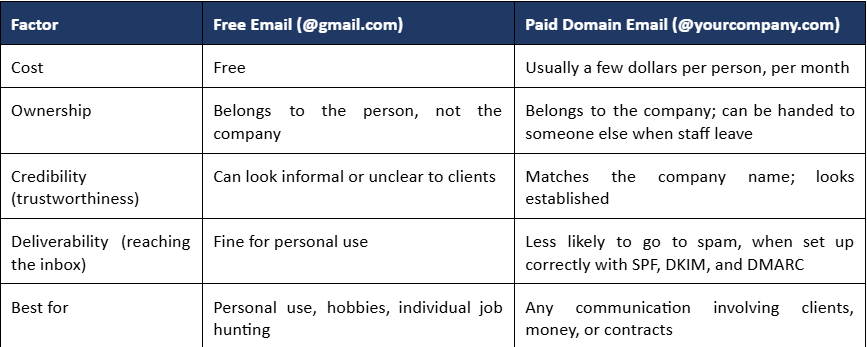
Before going into detail, it helps to compare the two choices side by side. Technically, both are “email.” The real difference is what comes after the @ sign, and who actually owns it.
2.1 Simple Analogy
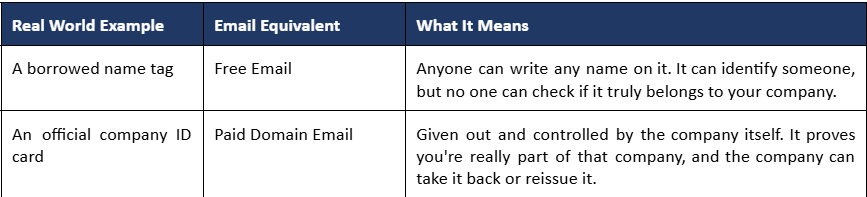
Think of it like a name tag compared to an official company ID card.
2.2 Free Email vs Paid Domain Email at a Glance
3.0 Free Email (@gmail.com): What It Is and Its Limits
3.1 What Is Free Email
A free email account, such as Gmail, Yahoo, or Outlook.com, can be created by anyone in a few minutes, at no cost, under a shared address like gmail.com. It belongs to a person, not a business, even if the business name appears before the @ sign.
3.2 When Free Email Is Perfectly Fine
- Personal use: emailing friends and family, personal admin.
- Job hunting on your own, before joining a company.
- A hobby project, community group, or very early idea with no clients yet.
3.3 Limitations for Business Use
Once money, contracts, or clients are involved, free email starts to work against a business:
- Anyone can create a similar-looking address, so clients can’t be sure it’s genuinely from the company.
- If the staff member who owns the account leaves, the business cannot get that inbox or its history back.
- It doesn’t carry the company’s name, so invoices, contracts, and proposals look less professional.
A survey Exabytes found that most customers see a professional email address as key to trusting a business, especially in a market where local and international brands compete side by side.
4.0 Paid Domain Email (@yourcompany.com): Ownership, Credibility, and Deliverability
4.1 What Is a Paid Domain Email
A paid company email works through a business email service, usually a business email host such as Exabytes, using the company’s own website address (the same one explained in our earlier article on Domain and Server). Instead of name@gmail.com, staff use name@yourcompany.com.
4.2 Ownership and Control
Because the company owns the domain, it owns every account created under it. When a staff member resigns, IT can turn off, reassign, or save their mailbox, instead of losing all their client conversations and history for good. This isn’t possible with a personal Gmail account.
4.3 Credibility and Deliverability
A paid company email is also less likely to end up in spam, because mail providers trust properly verified domains more, using the same SPF, DKIM, and DMARC settings referenced in our earlier article on DNS records. And simply put, “sarah@morrisonlaw.com” looks more trustworthy than “morrisonlaw2024@gmail.com” on an invoice or contract. Clients notice this, even if only without realising it.
Simple rule: for personal or hobby use, free email is fine. But once money, contracts, or clients are involved, a paid company email is basic good practice, not an extra you can skip.
5.0 Proper Email Usage: Best Practices
Choosing the right address is only the first step. A few daily habits decide whether an email gets read and answered quickly, or just gets skimmed, ignored, or misunderstood.
5.1 Subject Lines
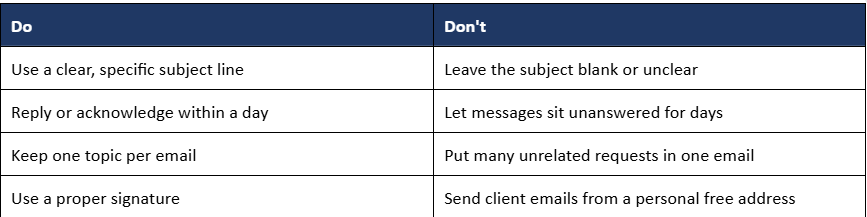
A subject line should say something clear. “Meeting” tells the reader nothing; “Meeting moved to 3pm Thursday, action needed” tells them straight away whether to open it now.
5.2 Response Time
Reply within a reasonable time, even if it’s just to confirm you got the message and give a rough timeline. Staying silent can feel like you’re being ignored, even if that isn’t the intention. Customers in Malaysia are also expecting faster replies these days: Malaysia’s e-commerce income passed RM1.29 trillion in 2024, according to the Department of Statistics Malaysia, and as ITGTEL notes, slow replies to increasingly cost sales in this fast-moving market.
5.3 Signatures
A proper signature, with your name, job title, company, and phone number if useful, saves the reader an extra question and makes you look more professional.
5.4 CC vs BCC
Use CC only for people who really need to see the email. Use BCC on purpose, mainly for sending updates to many people, not as a quiet way to watch someone without them knowing.
5.5 Quick Reference: Do's and Don'ts
6.0 Can a Boss Monitor Multiple Employees' Emails at Once?
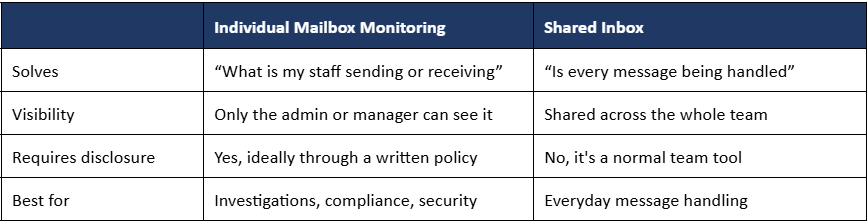
This is really two different questions dressed up as one. The first is “can I watch what my staff are doing?” The second is “how do I make sure customer messages never get missed?” These need different tools and mixing them up usually creates more problems than it solves.
6.1 Technical Capability
Yes, this is technically possible, if the company uses a paid business email service. Through a business email host such as Exabytes, for example, an admin can set up mailbox monitoring so that one chosen account automatically gets a copy of another person’s incoming and outgoing mail. Importantly, this isn’t limited to one person at a time: one admin account can be set up to watch many staff mailboxes at once, running quietly in the background, as part of the admin-level controls that come with a business email hosting plan.
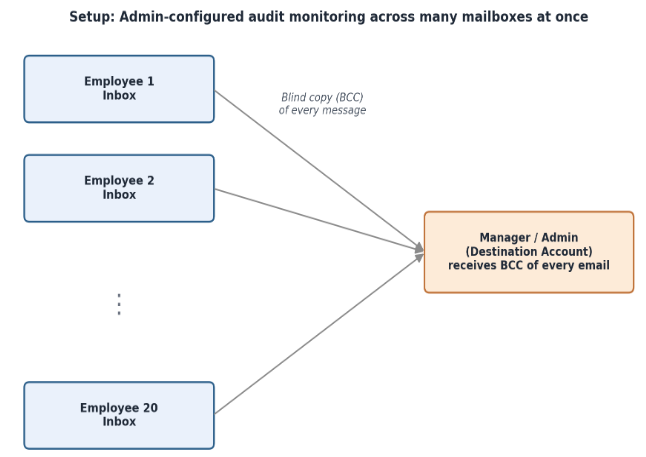
None of this needs the manager to sit and refresh twenty separate windows all day. Once it’s set up, the monitoring simply runs by itself.
6.2 Legal and Ethical Considerations
Because the company owns the domain and the accounts, this kind of monitoring is usually allowed, but it should never be turned on secretly. The common advice is to state it clearly in a written company policy, so staff know monitoring exists and understand what happens if it’s misused. In Malaysia, this kind of monitoring falls under the Personal Data Protection Act (PDPA), so if the real goal is serious investigation, like checking for wrongdoing or security issues, it’s worth getting clear advice from a lawyer or HR before turning anything on. Just because something is legal doesn’t automatically make it good for team trust or morale.
6.3 A Better Alternative: Shared Inbox Systems
If the real worry is “messages are getting missed” rather than “I need to watch my staff,” then watching every mailbox is a clumsy fix for what is really a workflow problem. Twenty separate personal inboxes were never designed to be watched over someone’s shoulder. That simply isn’t what they’re built for.
What actually solves this is a shared inbox. Instead of messages landing in twenty separate personal inboxes, everything lands in one address, such as support@company.com or sales@company.com, that the whole team can see at once. Tools like ITGTEL’s Omnichannel platform, a Malaysian business communication provider that brings WhatsApp, email, and other channels into one shared inbox, or even a free shared mailbox in your email hosting plan, let messages be assigned to a person, marked as handled, and flagged if no one has replied after a set time.
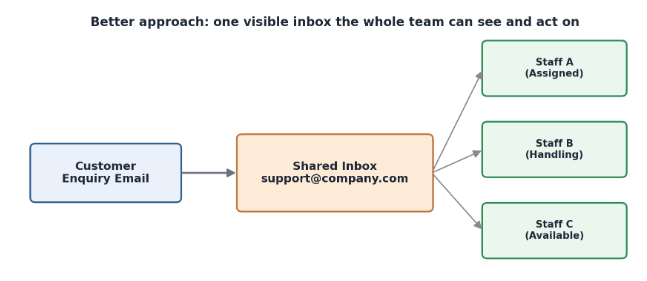
Nobody needs to look into anyone’s personal mailbox. Everyone can see what needs to be done, because the system is built for it, and it solves the real problem instead of a similar but different one.
6.4 Monitoring vs Shared Inbox: Summary
The troubleshooting conversation attributes the missing webmail history to Gmail POP3 retrieval without “Leave a copy of retrieved message on the server.” It reports that the older messages are in Gmail and proposes Outlook with IMAP as the restoration path. The issue should be treated as resolved only after Gmail contents are confirmed, the provider-approved server settings are used, and sample plus full-range restoration is verified in webmail.
7.0 Conclusion
A business’s email reputation comes down to two things: the address it sends from, and the habits behind how it’s used. A free Gmail address is fine for a person; a business that talks to clients, sends invoices, or is building a brand needs a paid company email, mainly for the trust and control it provides.
7.1 Key Takeaways
- Free email: fine for personal use, but it isn’t owned or controlled by the company.
- Paid company email: important once money, contracts, or clients are involved. It’s owned by the company and trusted more by mail providers.
- Good email habits, clear subject lines, quick replies, proper signatures, matter just as much as the address itself.
- Yes, a boss can technically monitor many staff inboxes at once through admin tools, but this should be disclosed, and checked against local law.
- If the real goal is “don’t miss messages,” a shared inbox solves that directly, without anyone needing to watch personal mailboxes.
7.2 Why Every Business Should Understand These Basics
In a market where clients judge trust within seconds, the email address a business uses, and how quickly it replies, are small but constant signals. Understanding the difference between free and paid email, building good email habits, and choosing the right tool to make sure messages are handled properly, instead of jumping straight to surveillance, gives a business more trust with clients, and more trust within its own team.
8.0 References
- Exabytes: https://www.exabytes.my/email/email-hosting
- Exabytes Blog (Email Security): https://www.exabytes.my/blog/the-three-essentials-for-email-security/
- Exabytes Blog (Business Email Malaysia): https://www.exabytes.my/blog/business-email-malaysia/
- ITGTEL: https://itgtel.com/
- ITGTEL Blog (Omni CX 2026): https://itgtel.com/omni-cx-2026-7-step-fix-for-slow-response-times-in-malaysian-e-commerce
- Department of Statistics Malaysia (DOSM): https://www.dosm.gov.my/
- NSA Legal (Employee Privacy Rights in Malaysia): https://nsa-legal.com/posts/employee-privacy-rights-in-malaysia-the-balance-between-workplace-monitoring-and-personal-freedoms